What an Audit Trail Actually Records (And Why It Matters in a Dispute)
An e-signature audit trail records who viewed the document, who signed it, when, from which IP address, and proves the file wasn't altered.
An e-signature audit trail records who viewed the document, who signed it, when, from which IP address, and proves the file wasn't altered.

An audit trail is the timestamped log attached to every signed document. It records who received the request, who opened it, who signed it, when, from which device and IP address, and whether the file changed after signing. It's your evidence layer when a counterparty says "I never agreed to that" — or claims the document was altered after they signed.
Most people treat e-signatures as a faster replacement for printing. The audit trail is what makes them defensible when something goes wrong.
Six events make up a complete record. Most disputes hinge on one or two of them, so it's worth knowing what each one captures.
Document hash (SHA-256) Before the invitation goes out, the platform generates a cryptographic fingerprint of the original file. If a single character in the document changes after that point, the hash changes. This is your tamper-evidence layer — if the document is identical when you produce it as when it was signed, the hashes match. If they don't, the modification is detectable.
Invitation sent Timestamp, recipient email address, and sender identity. If someone claims they never received the request, this event confirms the exact address the invitation was sent to and when. Some platforms also log delivery status — whether the email was delivered, bounced, or marked as spam.
Document viewed The moment the recipient clicked the link and opened the document: date, time, and IP address. This is the most commonly missing event in minimal audit trails — and the first thing an opposing attorney will look for. It establishes that the signer had access to and actually opened the specific document before signing.
Authentication step If the platform required the signer to verify their identity — enter an email code, confirm their address, pass a two-factor check, or upload an ID — this event logs which method was used and whether it passed. Higher-tier verification creates a stronger identity record.
Signature applied The core event: timestamp, IP address, browser, and operating system. The signature data is embedded directly into the PDF at this point, and the document is re-hashed to reflect the final signed state. The new hash proves no edits occurred between the document being received and the signature being applied.
Certificate of completion A separate PDF generated after all parties have signed. It contains the full event log, all document hashes, and is cryptographically signed by the platform itself. This is the document you attach to a demand letter or present in a dispute. It's the audit trail in a form anyone can read and verify.
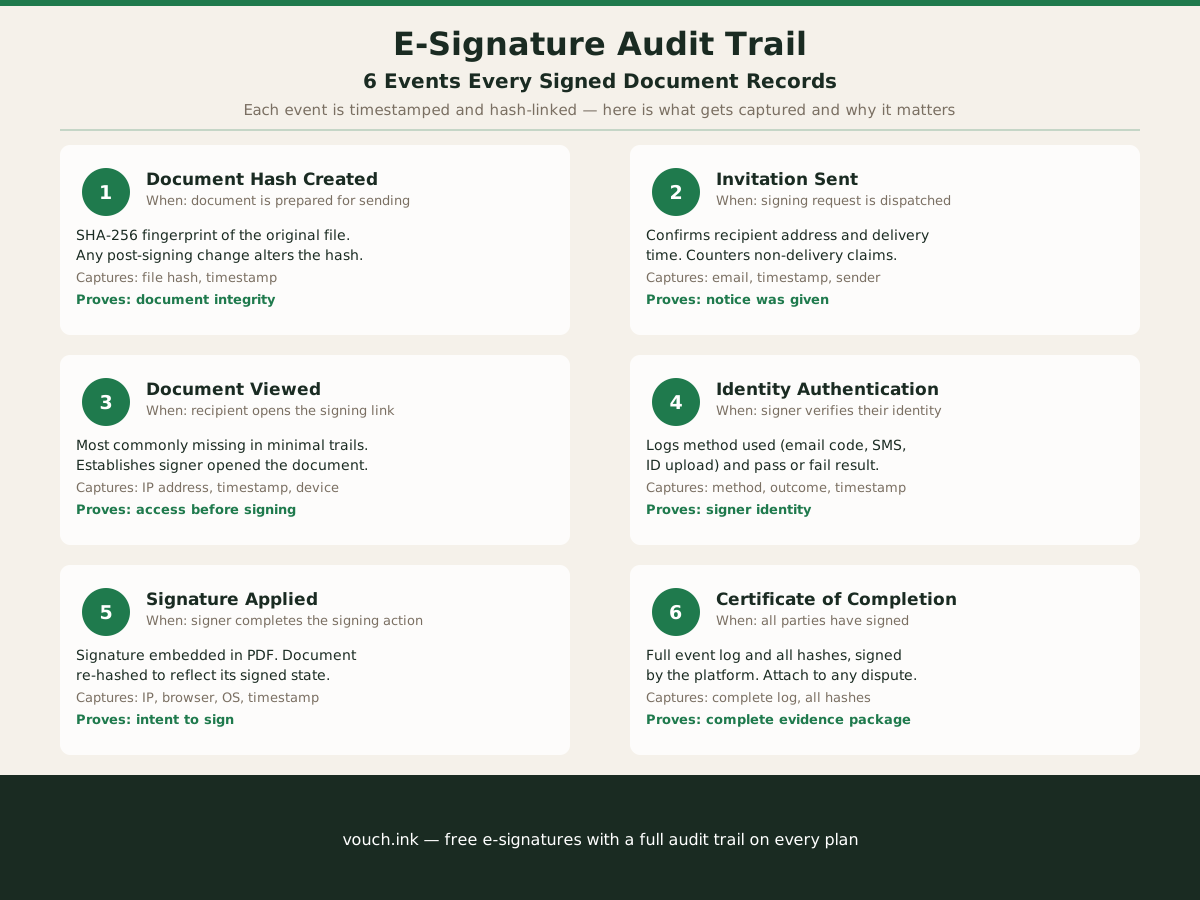
The six events above represent a complete record. Not every signing service captures all of them — and those gaps matter.
| Feature | Minimal audit trail | Full audit trail |
|---|---|---|
| Document hash on creation | Sometimes | Always |
| Per-event timestamps | Yes | Yes |
| IP address per event | Sometimes | Always |
| View event before signing | Often missing | Always |
| Identity authentication log | Add-on | Included or configurable |
| Certificate of completion PDF | Usually | Always |
| Platform cryptographic signature on cert. | Often missing | Always |
| Retention period | 90 days on free plans | Multi-year |
Third-party signing services vary considerably on the view-event field and IP capture. A platform that only logs the final signature event can't answer "did they actually open and read the document?" — a question that surfaces in nearly every material dispute.
A freelance event coordinator in Charleston booked a 200-person corporate reception for $11,400. Six weeks out, the client claimed the scope of service had been changed after signing — they'd agreed to a smaller package, not the full production.
The coordinator had sent the contract through an e-signature platform that captured the full event chain. The certificate of completion showed:
The dispute ended without litigation. The client's attorney reviewed the certificate and declined to pursue the claim.
The audit trail didn't require a judge. It made the facts too expensive to argue around.
The ESIGN Act requires that electronic records be retainable and accurately reproducible. Courts evaluating a challenged e-signature typically look for three things: identity (how was the signer authenticated?), intent (did they take a deliberate action to sign?), and document integrity (is this the document they agreed to?).
A well-formed certificate of completion addresses all three. The IP address and authentication event speak to identity. The signature event — an affirmative click, typed name, or drawn signature — speaks to intent. The document hash speaks to integrity.
None of this is automatic. A platform that skips authentication and doesn't capture IP addresses creates a record that's much easier to challenge in court or arbitration. The technical detail of what your signing platform captures matters — not just whether it has a signing flow.
For the full picture of what makes a signature valid under these laws, see our guide to what makes an e-signature legally binding. For vouch.ink's record-keeping and compliance documentation, visit our compliance page.
Before you finalize an important contract, run this quick check on the platform you're using:
If your current tool can't confirm all six — especially the view event and IP capture — you're working with a minimal audit trail. That may be acceptable for low-stakes documents. For any agreement with real financial exposure, you want the complete record.
Retention follows the underlying document. For most service contracts, that's three to seven years depending on your state's statute of limitations for contract claims. Employment documents and leases often run longer.
Download the signed PDF and the certificate of completion immediately after signing and store them in your own system. Don't rely on the platform's storage alone — many free plans on third-party signing services purge records after 90 days, and by the time a dispute surfaces, that window may have closed.
The practical rule: treat the certificate of completion the way you'd treat a paper contract. File it, back it up, and keep it for at least as long as the obligation it covers.
It records six events: the document hash before sending, the invitation being sent, the document being opened, the signer's identity verification, the signature being applied, and the certificate of completion. Each event includes a timestamp and most include an IP address.
Yes. A full audit trail with IP addresses, timestamps, and a cryptographic document hash proves identity, intent, and document integrity — the three things courts and mediators look for when an e-signature is challenged. Without it, a dispute is much harder to resolve without litigation.
The audit trail is the event log — the raw record of every action taken on the document. The certificate of completion is a PDF that packages the audit trail, all document hashes, and the platform's own cryptographic signature into a single shareable file you can attach to a demand letter.
No. Some platforms only log the final signature event and omit the document-viewed step or IP address capture. This creates gaps in the evidence chain that are easy to challenge in a dispute. Before choosing a signing service, verify it records the view event and captures IP addresses for each action.
Keep them for at least as long as the underlying document requires — typically three to seven years for service contracts, longer for employment documents and leases. Download and store the certificate of completion yourself; many free plans purge records after 90 days.