The 2026 Small-Business Guide to E-Signatures
What the law requires for valid e-signatures, what your audit trail must capture, and how to set up your first small-business signing workflow.
What the law requires for valid e-signatures, what your audit trail must capture, and how to set up your first small-business signing workflow.

E-signatures cover the contracts you send every week — service agreements, deposit invoices, contractor terms, lease renewals. As a small business you're probably sending 5 to 20 contracts a month. At that volume, a broken signing setup costs you deals: clients who don't finish signing, disputes you can't resolve, deposits that fall apart. Getting the setup right takes about an hour total.
Done right, e-signatures are faster than paper and give you a clear record if a dispute comes up. Done wrong, you have a signed-looking PDF and nothing you can actually prove with it.
This is what doing it right looks like.
Two rules govern e-signatures in the U.S. The ESIGN Act (2000) covers interstate commerce. The Uniform Electronic Transactions Act (UETA), adopted in 49 states, covers state-level transactions. Together they set four conditions for a valid e-signature:
"Consent to transact electronically" does not require a separate legal form. Clicking through a link and accepting an opening consent screen generally satisfies this condition. The best signing tools present an explicit acknowledgment — something like "I agree to conduct this transaction electronically" — before the signer ever sees a signature field. Without that step, there is no logged consent record, only a signature.
Most everyday contracts satisfy all four conditions: service agreements, NDAs, independent contractor agreements, coaching contracts, deposit agreements, lease renewals. The narrow exceptions where ESIGN does not apply: wills, certain family-law court orders, utility disconnection notices, and a small set of regulated consumer product safety notices.
Check vouch.ink's compliance page for a full breakdown of ESIGN vs. UETA interactions, including state-level nuances.
Full ESIGN Act text is available via the FTC's business guidance portal.
Most guides rank tools by feature count and pricing tiers. The more useful question: what can you actually demonstrate if a client disputes a contract?
| What to evaluate | Basic (PDF mark-up) | Standard (signing flow) | Audit-trail (hash-chained) |
|---|---|---|---|
| Proof of who signed | Email only | Email + IP + timestamp | Email + IP + timestamp + device |
| Document integrity | None | Varies | Cryptographic hash of final file |
| Consent captured | Not recorded | Some platforms | Explicit ESIGN consent screen |
| Exportable record | Email thread | Platform dashboard | Downloadable audit log |
| Signer needs an account | No | Usually not | No |
For most small businesses, Standard is the minimum worth using. Basic tools — annotating a PDF and emailing it back — leave no server-side record at all.
A photographer who lost a $4,200 wedding deposit dispute used exactly this approach. She sent a PDF with a "sign here" annotation and received it back with a typed name. When the client disputed the contract, she could not show the document had been opened, who had typed the name, or when — the tool had no server-side record of any of it. The client claimed they never saw the contract. There was nothing to contradict them.
An audit-trail tool would have logged every step: email sent, link opened, document viewed for three minutes, signature applied — each with an IP address and a timestamp. The final document hash would have confirmed the document was not altered after signing.
For a comparison of how different tools handle this, see vouch.ink's e-signature comparison guide.
It takes under 10 minutes to configure once and under 90 seconds per contract after that.
Step 1 — Create your template once. Upload your contract to a signing tool. Add a signature field and a date field. Save it as a named template. You do this once per contract type — once for your service agreement, once for your deposit invoice, once for your lease form. Three templates covers most small businesses completely.
Step 2 — Send from the template. Enter the client's email. Add a note ("Please review and sign before we begin."). Send. The tool handles the consent screen and the signing flow automatically.
Step 3 — They sign on any device. No account required on their end. They get a link, accept the consent screen, sign with a mouse or a finger, and they are done in under a minute from any phone or laptop.
Step 4 — Download and store both files. Once signed, download the completed PDF and the audit trail separately. Store them in the same folder. An audit log separated from its document is much harder to use if you ever need to reference it.
A 47-unit landlord in Towson runs his annual lease renewals this way. He sends 47 templates in about 30 minutes each late July. Every signed lease returns with a full audit log before move-in day. Before this setup, he was printing lease packets, mailing them out, chasing signed copies by certified mail, and scanning everything back to his records — the whole renewal cycle took 3 to 4 weeks. Now it takes one afternoon. He has had three tenants dispute lease terms over two seasons; all three were resolved in under an hour by pulling the audit trail, which showed exactly which lease version each tenant received, when they opened it, and when they signed.
For step two in detail, see How to Send a PDF for Signature.
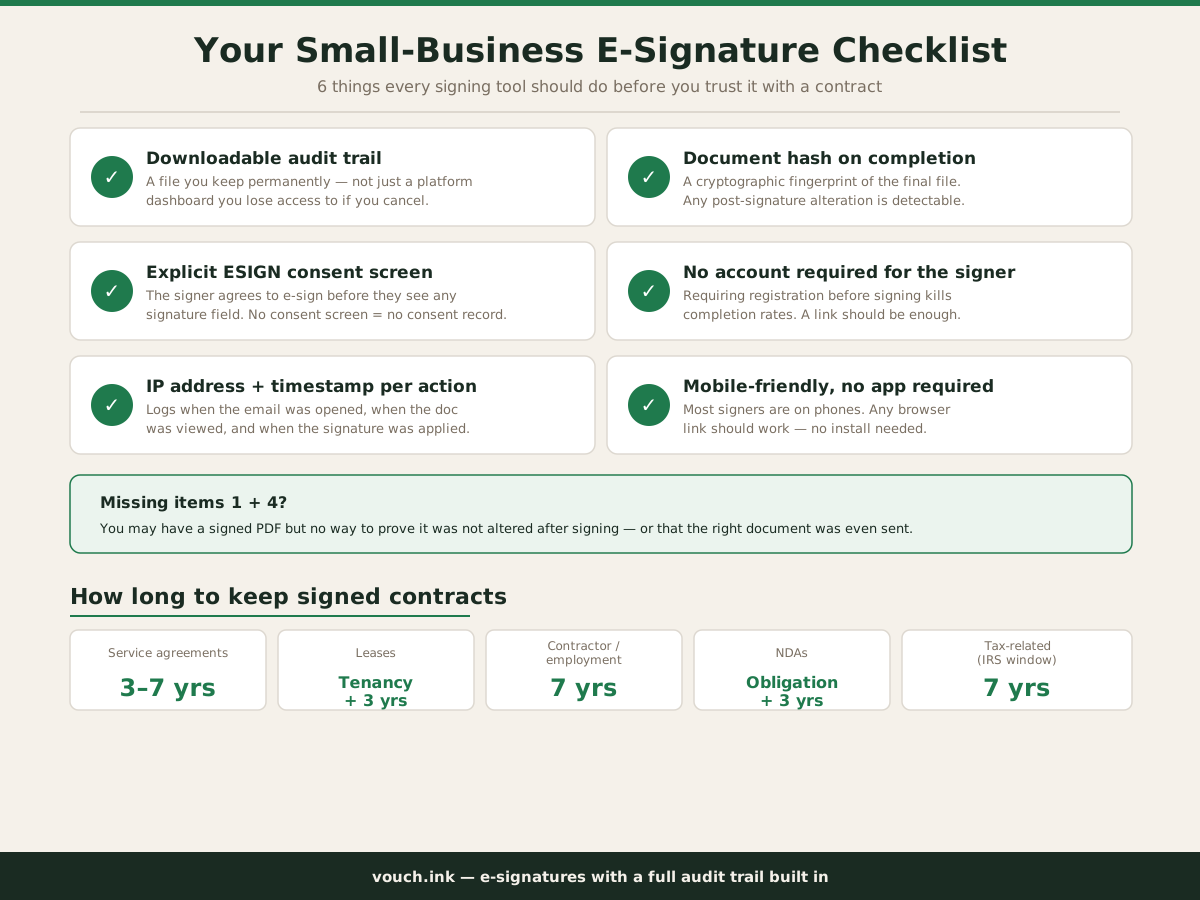
Before committing to any tool, run these six checks:
A tool that hits all six costs no more — usually less — than one that does not. The difference is what you can demonstrate if a dispute comes up. See features and pricing at vouch.ink.
| Contract type | Recommended minimum retention |
|---|---|
| General service agreements | 3–7 years from completion |
| Lease agreements | Length of tenancy + 3 years |
| Contractor and employment agreements | 7 years after the relationship ends |
| Tax-related agreements | 7 years (IRS audit window) |
| NDAs and confidentiality agreements | Duration of obligation + 3 years |
| Waivers and consent forms | 3–5 years; longer when minors are involved |
Store the signed PDF and the audit trail in the same folder or record. An audit log separated from the document it covers is much harder to reference when you need it.
Ready to set up your first signing workflow? Get started free at vouch.ink.
Under the ESIGN Act and UETA (adopted in 49 states), an e-signature is valid when the signer intended to sign, both parties consented to transact electronically, and the signature is associated with the record. A proper signing tool captures all three automatically with a timestamped audit trail.
No law requires a paid service. Legal validity comes from intent, consent, and a verifiable record — not from which platform you use. That said, any tool that does not store a downloadable audit trail leaves you with almost nothing to show in a dispute.
At minimum: the signer's email address, IP address, a timestamp for each action (email opened, document viewed, signed), and a cryptographic hash of the final document so any post-signature alteration is detectable.
Yes — a narrow list. The ESIGN Act excludes wills, certain family-law court orders, utility termination notices, and a handful of regulated consumer safety notices. Service agreements, NDAs, contractor agreements, lease renewals, and deposit agreements are all within scope.
It depends on the type: service agreements 3 to 7 years, leases through the tenancy plus at least 3 years, contractor and employment agreements 7 years after the relationship ends, and tax-related agreements 7 years to match the IRS audit window.