How to E-Sign a PDF on Android in Under 60 Seconds
The fastest way to sign a PDF on Android—browser-based, no app install needed, with a full audit trail that holds up if the document is ever disputed.
The fastest way to sign a PDF on Android—browser-based, no app install needed, with a full audit trail that holds up if the document is ever disputed.
You can sign a PDF on Android in under 60 seconds. Open the signing link in Chrome, tap the signature field, draw or type your name, and hit Done. The signed document is ready to download immediately—no app, no account required on the recipient side.
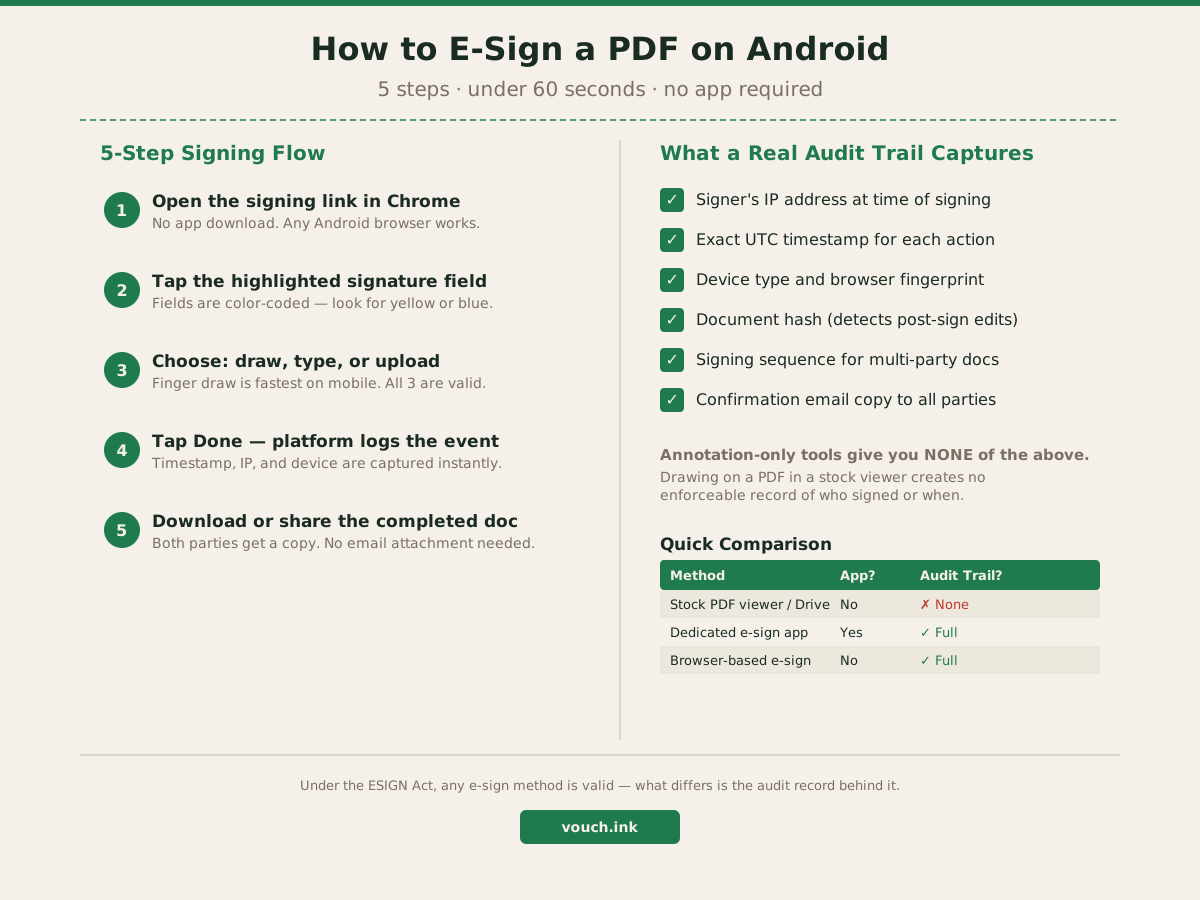
Here's the fastest path when you've received a signing link:
The whole process takes under a minute for a single-signer document. For multi-party agreements, you sign your fields and the platform routes it to the next person—you don't have to track who still needs to sign.
There's a hard line between tools that capture a signature image and tools that build a verifiable record of who signed what and when.
When you draw on a PDF in Google Drive or a stock file viewer, you're adding an annotation. There's no timestamp, no record of your IP address, no proof the specific person who was supposed to sign actually did it. For a grocery list, that's fine. For a lease, a service contract, or a payment agreement, it creates a gap you don't want.
A platform built for e-signatures captures:
Under the ESIGN Act (15 U.S.C. § 7001), an electronic signature is valid when the signer's intent is captured and the record is retainable. The method—finger draw, typed name, uploaded image—doesn't change that. The ESIGN Act text specifies the record requirements, not the signature format.
| Method | App required? | Audit trail? | Best for |
|---|---|---|---|
| Stock PDF viewer / cloud storage annotation | No | None | Personal notes only |
| Dedicated e-sign app (download required) | Yes | Full | Frequent signers with saved accounts |
| Browser-based e-sign | No | Full | One-off or occasional signing |
The browser path is the best starting point for most Android users. No install friction, no account required on the signer's side, and you still get the full audit record. If you're signing dozens of documents per month, a dedicated app might save a few taps—but for most individuals and small-business owners, the browser workflow is faster to start and just as reliable.
Marcus runs a 3-person HVAC crew in Charlotte. He closes a $6,800 commercial service job on a Tuesday morning. The client is at the property, equipment is in the truck, and Marcus needs a signed service agreement before work starts.
Old workflow: email a PDF attachment, wait for the client to print it, sign it, and scan or photograph it back. That wait sometimes stretched two to three days.
New workflow: Marcus opens a signing link and texts it to the client. The client opens it in Chrome on their Android phone, taps the signature field, draws their name with a finger, and hits Done. Marcus gets a confirmation email with the completed agreement before he unloads the first piece of equipment.
The $6,800 job started the same morning. The signed agreement, with a full audit record, was in Marcus's inbox by 9:45 AM.
When you get a signing link on your Android phone, spend 15 seconds on these before signing:
If any of these are missing, you may be annotating a PDF rather than signing it through a platform that generates an enforceable record.
The steps are nearly identical on iOS. See our guide: How to E-Sign a PDF on iPhone in Under a Minute.
For the full picture of what the ESIGN Act requires for a signature to be enforceable, see: What Makes an E-Signature Valid (Plain English).
Ready to send your next document for signature from any device? Start signing free →
Yes. Browser-based e-sign tools let you open a signing link in Chrome, add your signature, and return the signed document without installing anything. The audit trail is captured automatically in the cloud.
A finger-drawn signature meets the ESIGN Act's requirements as long as the signer intended to sign and the platform captured a timestamped record of that intent. The quality of the drawing is irrelevant—the audit trail behind it is what matters.
Annotation tools let you draw on top of a PDF but record nothing about who did it or when. A proper e-sign platform captures IP address, timestamp, device type, and a document hash—creating a verifiable record of the signing event.
Only if the platform is built for it. Drawing on a PDF in a notes app or cloud storage viewer creates no audit record. Dedicated e-sign platforms log each action with a timestamp, IP, and device fingerprint tied to the specific signer.
Most browser-based tools let you download the signed PDF or generate a completion link. Both parties receive a confirmation email automatically—you don't need to attach or forward anything manually.