DocuSign vs. Adobe Sign vs. vouch.ink: Real-World Pricing Comparison
DocuSign and Adobe Sign look nearly identical on paper — the real difference shows up in month eight when your envelope count runs out.
DocuSign and Adobe Sign look nearly identical on paper — the real difference shows up in month eight when your envelope count runs out.

If you're comparing DocuSign vs. Adobe Sign, here's the direct answer: DocuSign's entry price looks lower, but Adobe Acrobat Sign gives you more sends per dollar at moderate volume. The real cost difference only becomes visible when you hit envelope limits — and both platforms have them.
For solo operators and small teams, that distinction is worth knowing before you commit to an annual contract.
DocuSign publishes three main tiers:
| Plan | Monthly price | Annual send limit |
|---|---|---|
| Personal | $15 | 120 docs/year (10/mo) |
| Standard | $45/user | 100 docs/user/year |
| Business Pro | $65/user | 100 docs/user/year |
The Personal plan's 10 sends per month sounds workable for light use. A freelance bookkeeper with 12 clients hits that ceiling the moment she sends quarterly engagement letters and a couple of revision drafts in the same month.
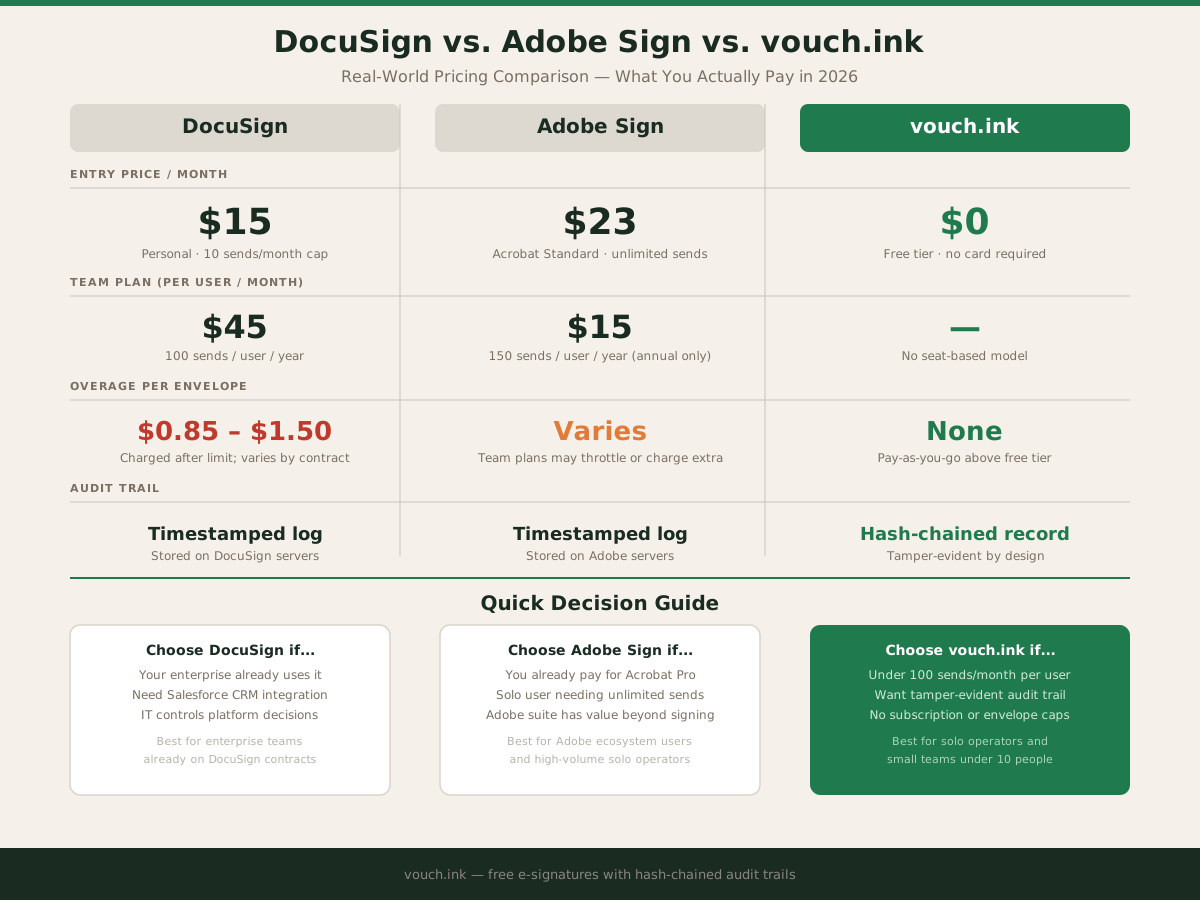
The Standard and Business Pro plans advertise "100 envelopes per user per year." That runs out by early September at a steady pace. Overages land at roughly $0.85–$1.50 per envelope — a line item that never shows up prominently on the pricing page.
If you need more than 100 sends per user annually, DocuSign's pricing escalates significantly. Enterprise tiers require a call with a sales rep, not a credit card checkout.
Adobe Sign isn't a standalone product — it ships as part of Adobe Acrobat subscriptions:
| Plan | Monthly price | Send limit |
|---|---|---|
| Acrobat Standard (individual) | $23 | Unlimited |
| Acrobat Pro (individual) | $30 | Unlimited |
| Acrobat Standard for teams | $15/user (annual) | 150 tx/user/year |
| Acrobat Pro for teams | $24/user (annual) | 150 tx/user/year |
Individual plans have no send cap, making Adobe Sign the stronger subscription pick for a solo user sending 30–50 documents per month. That said, you're paying for the full Acrobat suite — PDF editing, OCR, conversion tools — so the value depends on whether those features earn their keep.
Team plans reintroduce the same trap: 150 transactions per user per year, with an annual commitment required up front. A two-person shop each sending 100 contracts bumps into that ceiling in October.
Marcus runs a remodeling operation in Phoenix — himself and one estimator. They send roughly 25 contracts per month: subcontractor agreements, change orders, material approval forms. That's 300 sends per year between them.
Here's what each platform costs at that volume:
DocuSign Standard, 2 users: $90/month = $1,080/year, covering 200 sends total (100 per user). They hit the annual limit mid-September and pay overage on the remaining 100 envelopes at $0.85–$1.50 each. Total annual spend: $1,165–$1,230.
Adobe Sign teams standard, 2 users: $30/month = $360/year, covering 300 sends total (150 per user). At exactly their volume, it fits — barely. One unusually busy month tips them into overage. Total: ~$360/year plus overage risk.
vouch.ink: No monthly subscription, no per-seat pricing, no envelope cap on the free tier. See current pricing — low-volume operators often pay nothing.
For a side-by-side on features beyond price, our DocuSign comparison page covers workflow differences in more detail.
Both platforms have a catch that the headline pricing hides: the best-value plans require annual commitment. Adobe Sign's $15/user team plan jumps to roughly $20/user if you pay month-to-month. DocuSign's Standard at $45/user is already month-to-month pricing — their annual pricing runs lower but locks you in for 12 months before you know your real send volume.
For a business in its first or second year, committing annually before you've established your document cadence is a real risk. You might over-buy and waste budget, or under-buy and hit overage fees anyway.
Both DocuSign and Adobe Sign include audit trails — timestamped records showing who signed, when, and from what IP. Useful and standard.
What neither surfaces clearly: whether the audit trail is cryptographically tamper-evident or whether it's a log file stored on their servers alongside the document. In a legal dispute, "we have a timestamp" and "we have a hash-chained record where any alteration breaks the chain" are different positions.
vouch.ink uses hash-chained audit records where each event is cryptographically linked to the one before it. Altering one event makes the break detectable. We've written a full breakdown of what an audit trail actually records if you want the technical details.
Timestamped logs satisfy the vast majority of use cases. The distinction matters if your industry involves higher dispute risk or long contract retention periods.
Under the Electronic Signatures in Global and National Commerce Act, a signature's validity rests on intent, consent, and record retention — not on which platform you use. DocuSign, Adobe Sign, and vouch.ink all operate within that framework.
What changes between platforms is the cost structure, user experience, and technical architecture of the audit record. None of them have a legal-validity monopoly.
Choose DocuSign if your company already standardized on it, you need deep Salesforce CRM integration, or enterprise procurement controls the software decision and switching costs are real.
Choose Adobe Sign if you already pay for Adobe Acrobat Pro and the signing feature is bundled value — the individual plan's unlimited sends make it the better subscription pick for solo users at moderate volume.
Skip both subscriptions if you send fewer than 50 documents per month and don't need enterprise workflow automation. A no-subscription option that doesn't gate on volume typically costs less over 12 months at that scale.
We don't charge for basic signing. No trial period, no credit card required, no envelope cap on the free tier. If your volume grows, our pricing page shows exactly where costs begin.
For solo users, Adobe Acrobat Sign individual plans offer unlimited sends at around $23/month — better value than DocuSign's $15/month plan capped at 10 sends. At team scale, Adobe's $15/user/month standard plan beats DocuSign's $45/user, though both cap annual sends per user.
DocuSign does not have a permanent free plan. It offers a 30-day free trial with limited sends. After that, the cheapest option is $15/month for up to 10 documents per month.
DocuSign's Personal plan caps you at 10 sends per month. The Standard plan allows 100 envelopes per user per year. Overages are typically charged at $0.85 to $1.50 per envelope depending on your contract.
No — Adobe Sign is bundled with Adobe Acrobat. There is no standalone free version. Individual Acrobat plans with Sign capability start around $23/month.
vouch.ink offers free e-signatures with a hash-chained audit trail and no envelope cap on the free tier. No credit card required to send your first document.